View Requests
Usage
This screen allows you view Staff Requests only (both shift & leave) in a rota view and allows you to manage these requests by providing a response to the request. E.g. To approve or decline the request.
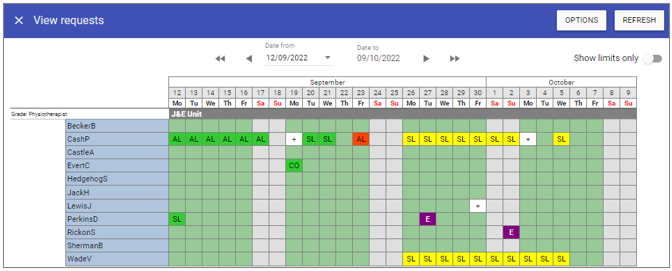
Options
 Use primary unit staff: Displays requests for staff who have the selected unit listed as their primary unit.
Use secondary unit staff: Displays requests for staff who have the selected unit listed as their secondary unit.
Include bank staff: Include staff whose staff type is bank.
Include contract as bank staff: Include staff whose staff type is contract as bank staff.
Include agency staff: Include staff whose staff type is agency staff.
Units: Select the unit to which the staff request pertains to.
4. Click on the Save button at the top of the screen.
Requests review - Leaves
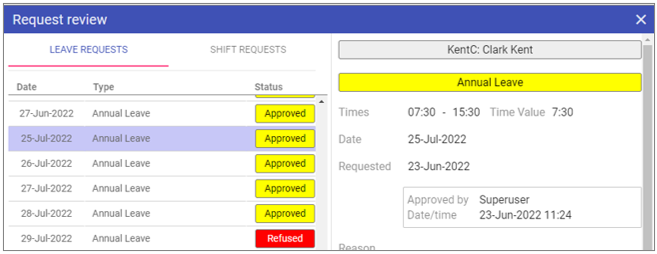
Response: A manager response to the request.
Status
Pending: The request has yet to be reviewed.
Approved: The request has been granted.
Refused: The request has not been granted.
Up to: Allows bulk changing of multiple requests to the same status.
Requests review - Shifts
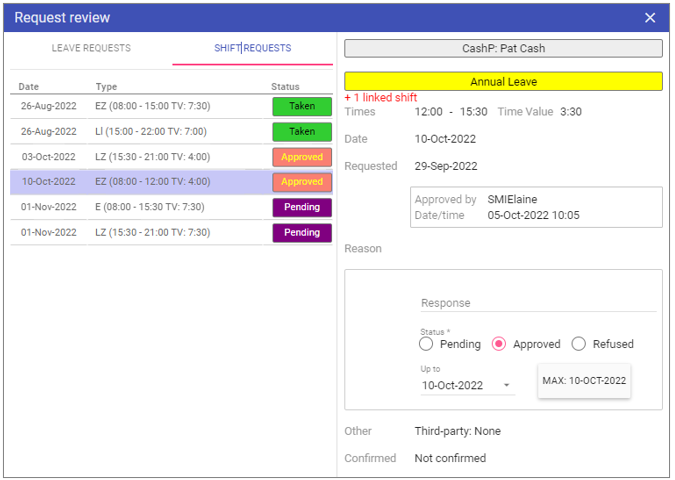
Response: A manager response to the request.
Status
Pending: The request has yet to be reviewed.
Approved: The request has been granted.
Refused: The request has not been granted.
Up to: Allows bulk changing of multiple requests to the same status.